15 capabilities, one workspace
Everything Your Organization Needs to Operate, In One Platform
Instead of juggling disconnected tools, PaperLite brings together 15 integrated capabilities to manage work, teams, clients, and operations, all in a single workspace built to scale with you.
- 15
- integrated capabilities
- 200+
- CA & CS firms onboarded
- 5 / 5
- average satisfaction
Not a stack of tools. One record, end to end.
Every capability below hangs off the same thread of work, so nothing has to be re-entered, re-explained, or reconciled later.
Client
Onboarded once, with contacts and history in the directory.
Engagement
Started from a template, so the scope is the same every time.
Tasks
Split, assigned and tracked with a deadline and an owner.
Documents
Requested from the client and attached where they belong.
Invoice & report
Billed and measured, with the trail still attached.
Run the work
Structure every engagement and keep it moving.
4 capabilities
Project & Workflow Management
Manage Projects With Complete Visibility
PaperLite allows teams to organize work into structured projects and workflows. Each project can contain tasks, documents, conversations, and billing information, giving teams a complete view of the work being done.
- Create and manage multiple projects
- Assign project owners and teams
- Track project progress in real time
- Set deadlines and milestones
- Maintain project history and activity logs
- Templatizable projects and services
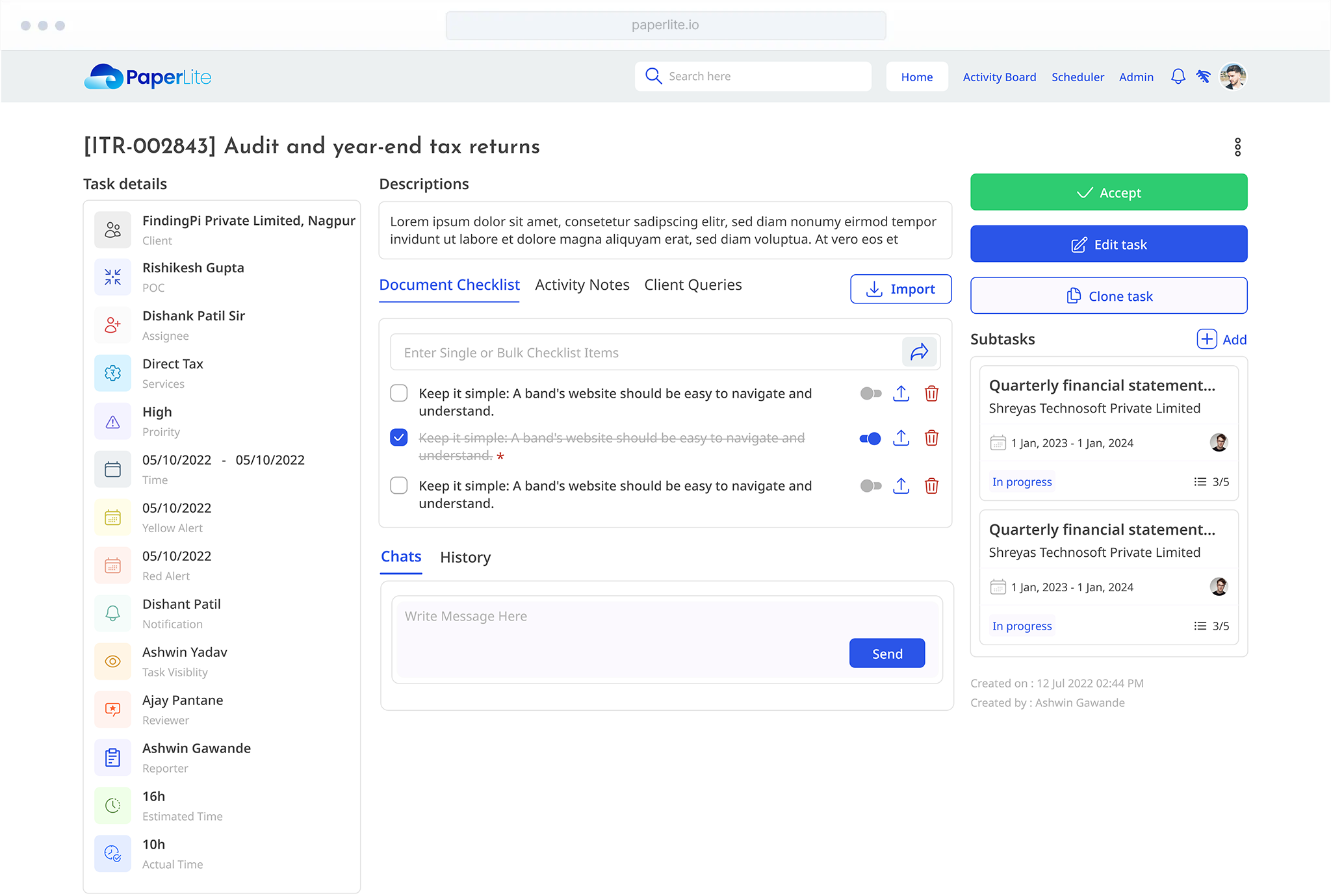
Task Management
Turn Work Into Trackable Task/Subtask Units
PaperLite provides powerful task management capabilities that allow teams to break work into manageable units. Tasks can be assigned, monitored, and updated in real time.
- Task and subtask creation
- Task assignment to team members
- Priority levels and deadlines
- Status tracking
- Task comments and collaboration
- Realtime notifications regarding delays or assignments
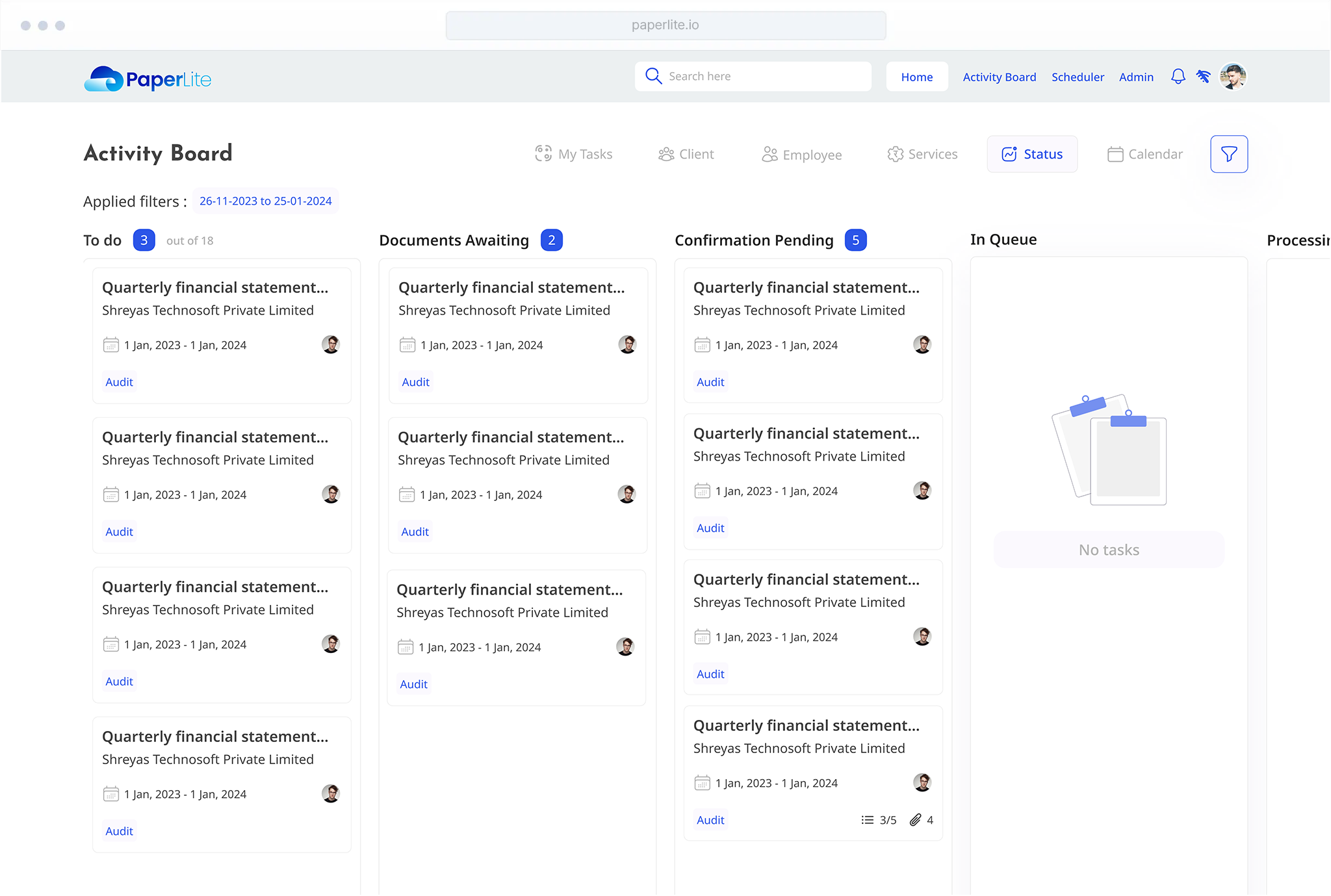
Activity Board
Stay On Top of Everything Happening
The Activity Board gives teams a centralized view of operational activity. It shows updates across tasks, projects, documents, and communication, helping teams stay aligned and informed.
- Monitor work progress
- Track recent updates
- Identify pending tasks
- Stay aware of team activity
Workflow Templates
Standardize Repetitive Processes
Many organizations repeat similar workflows across projects. PaperLite allows teams to create templates that standardize these processes, ensuring consistency and reducing setup time.
- Project structures
- Task sequences
- Workflow steps
- Activity checklists
Communicate & collaborate
Keep your team and your clients on the same page.
4 capabilities
Team Communication
Built-In Chat for the Whole Team
PaperLite includes team chat, with one-to-one conversations and group chats, so your team talks inside the platform. Instead of switching between tools, conversations happen alongside the work being done.
- One-to-one team chats
- Group chats
- Task and project discussions
- Mentions and notifications
- File sharing within chats
Client Communication
Keep Client Conversations Organized
PaperLite allows organizations to manage client communication in a structured way. Client communication is tied directly to projects and tasks, and clients can ask you for a meeting or a new service without starting an email thread.
- Clients can request a meeting with you
- Clients can request a service from you
- Quickly share queries and get responses from clients
- Share documents with clients
- Maintain communication history
- Client Chats (coming soon)
- Client Tickets (coming soon)
Documents and Co-working
Write Together, in Real Time
Docs, PaperLite’s collaborative editor, lets several people work on the same document at the same time, the way they would in Google Docs. Meeting notes, internal references and working drafts stay inside the workspace where the rest of the engagement lives.
- Several people editing one document at once
- See teammates’ changes as they happen
- Rich text editing
- Share documents with your team
Centralised Directory
Keep All Important Contacts in One Place
PaperLite provides a centralised directory that allows organizations to maintain structured information about all important stakeholders, clients, team members, and collaborators.
- Detailed profiles for clients and staff
- Store contact details, roles, and associated organizations
- Track historical associations with projects and teams
- Maintain records of ex-employees for compliance purposes
Operate & grow
The operational backbone: documents, billing, insight.
7 capabilities
Document & File Management
Organize Files Without Chaos
Documents are an essential part of every organization's workflow. PaperLite's File Manager organizes every file by client, then service, then task, and gives each client a view of just their own service and task files.
- File Manager: client, then service, then task
- Clients see only their own service and task files
- File tagging and categorization
- Version history
- Access permissions
- Quick previews (coming soon)
Calendar & Scheduling
Manage Meetings and Deadlines
PaperLite includes an integrated calendar that helps teams stay on top of meetings, deadlines, and important events. Important commitments are never missed.
- Schedule meetings
- Track project deadlines
- Set reminders
- View team calendars
- Sync across PaperLite and Google Calendars
Invoice Tracking
Manage Billing and Payments
PaperLite includes built-in invoice tracking that helps organizations manage billing workflows and monitor payments, maintaining clear financial records and revenue visibility.
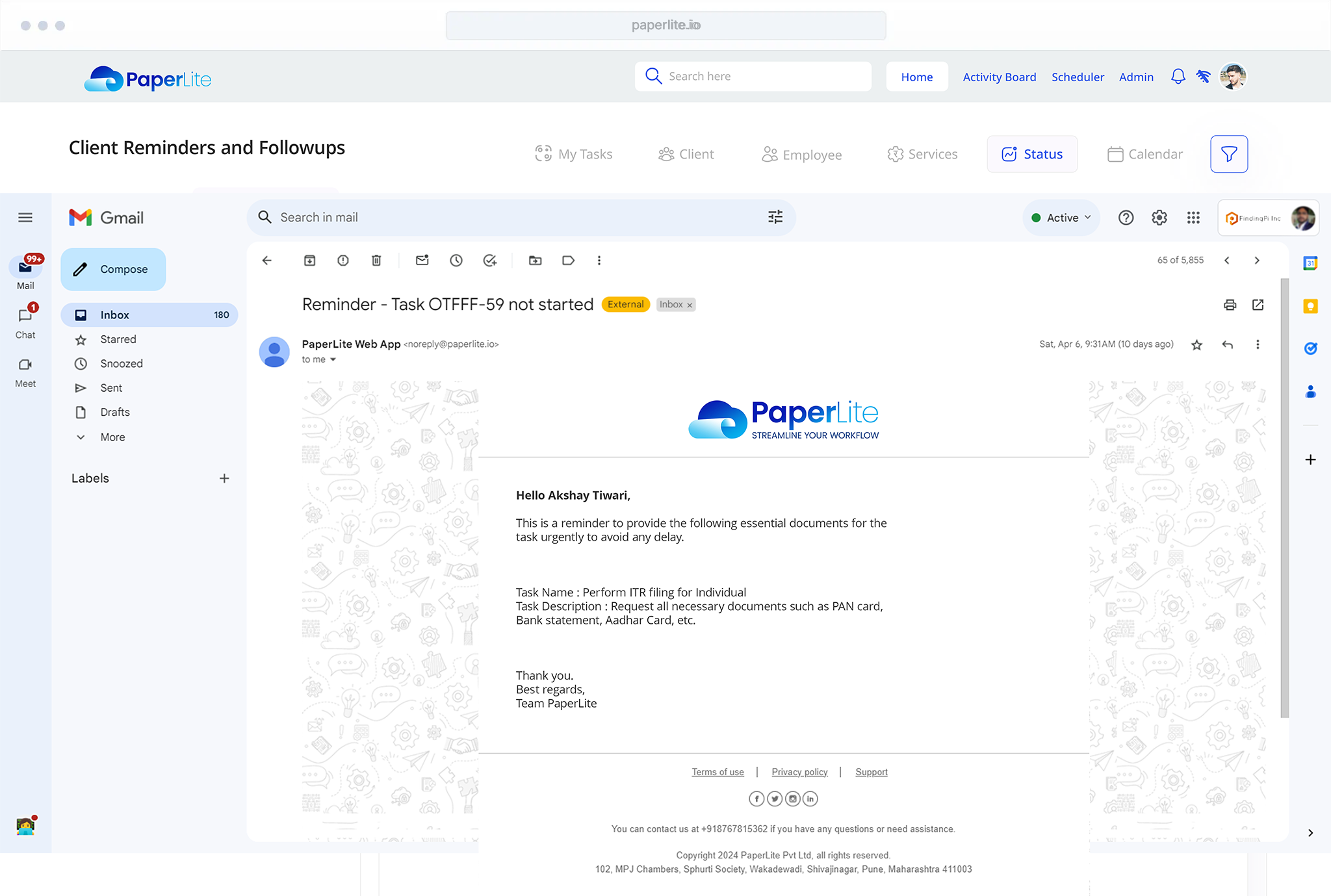
- Recurring or single invoice reminders
- Payment tracking
- Client billing history
- Invoice notifications to self
- Invoice reminders to clients
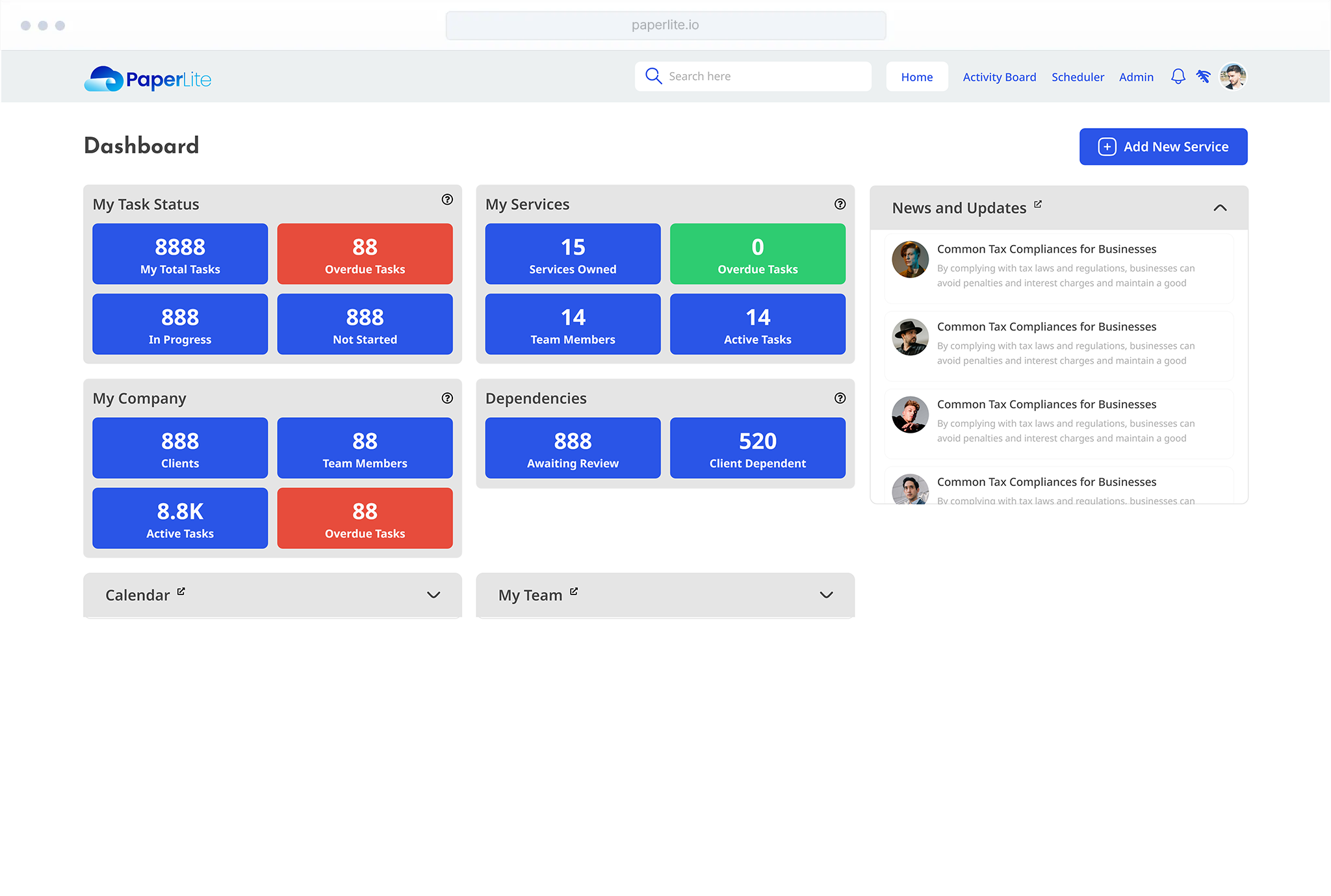
Reporting & Insights
Understand How Work Gets Done
PaperLite provides reporting tools that help leaders understand operational performance and improve productivity and decision-making.
- Project progress reports
- Task completion rates
- Team workload overview
- Operational activity summaries
- Financial metrics
AI-Powered Assistance
Smarter Workflows With AI
PaperLite integrates AI capabilities to help teams work faster and smarter. As AI capabilities evolve, PaperLite continues to integrate intelligent tools to enhance productivity.
- Drafting responses
- Summarizing documents
- Searching knowledge
- Assisting with workflows
Multiple Firm Management
Manage Multiple Organizations From One Platform
PaperLite allows users to manage the operations of multiple firms or business entities under a single license, maintaining separate operational setups within a unified platform.
- Manage multiple firms under one account
- Separate clients, projects, and documents per firm
- Configure separate invoice and billing settings
- Maintain different SOPs and workflows per firm
- Assign teams and users across multiple firms
Mobile Application
Manage Work Anywhere
PaperLite offers a mobile application for Android and iOS, allowing teams to stay connected and manage work even while away from their desks, including by voice.
- Voice commands for hands-free work
- Track tasks and project progress
- Receive real-time notifications and reminders
- View upcoming meetings and deadlines
- Communicate with team members
- Access important documents
Built to Scale With Your Organization
PaperLite is designed to support organizations at every stage of growth. Whether you are a small team organizing projects or a growing company managing complex workflows, PaperLite provides the structure and visibility needed to scale efficiently.
- 50K+
- document reminders sent
- 15,000+
- tasks completed monthly
- Solo to 200+
- team sizes running on PaperLite

Imagine Your Office... 3x More Effective.
PaperLite Makes it a Reality.
PaperLite users see an average of 3x greater efficiency after onboarding. Get started today.
Every task carries its own deadline and owner. PaperLite tracks progress and nudges the right person automatically, so work moves forward without anyone chasing an update.

Get Started with PaperLite.
See how PaperLite fits your firm's workflow, from client onboarding to filing and follow-up. Book a short meeting and we'll walk you through it.
30 minutes with the PaperLite team. No slides, no sales script, just your actual workflow.
Book a Walkthrough